

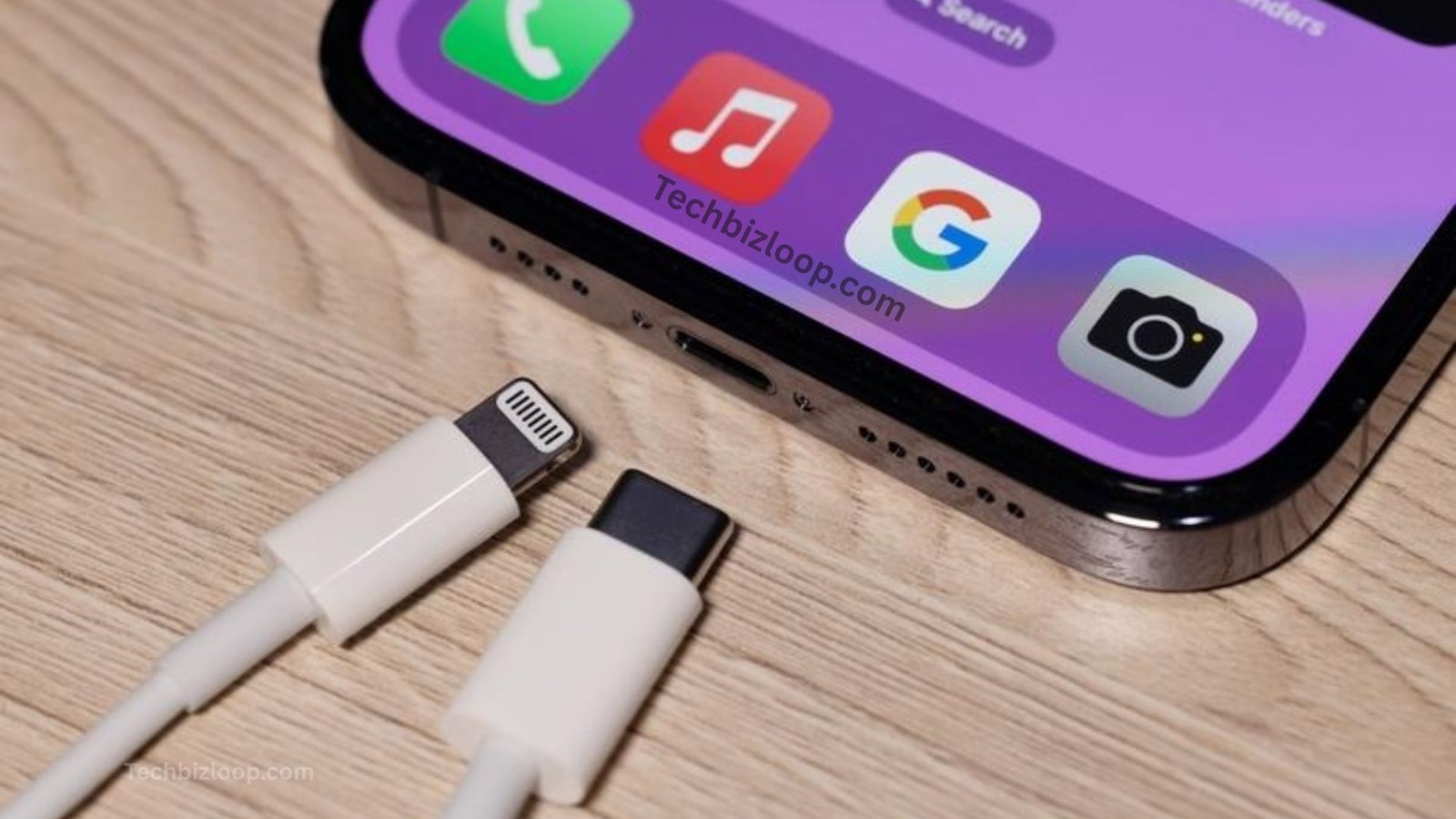
iPhone charging cord shopping looks simple until you see two different plugs. Pick the wrong one, and it won’t fit. This guide helps you choose the right cable, pay a fair price, and make it last.
What Is an iPhone Charging Cord?

An iPhone charging cord is a cable that sends power to your phone. It also moves photos and files to a computer. One end plugs into your phone, and the other plugs into a charger. The cable is only one part of the setup. Your wall adapter and phone also set the speed. A weak adapter slows even the best cable.
Read Also : Ponas Robotas
Different Types of iPhone Charging Cords
Four cable styles cover almost every iPhone.
USB-C to USB-C Charging Cable
This Apple USB-C cable fits iPhone 15 and newer. Apple rates its own version for up to 60W, which is more than an iPhone needs. Most models transfer data at 480 Mbps. Pro models reach 10 Gbps, but only with a USB 3 cable.
USB-C to Lightning Charging Cable
The USB-C to Lightning cable suits iPhone 14 and earlier. It supports fast charging on iPhone 8 and later. Apple says a 20W adapter reaches about 50% in 30 minutes. That makes it a true iPhone fast charging cable.
USB-A to Lightning Charging Cable
This older Lightning charging cable has a flat, rectangular plug on the power end. It works with old wall bricks and car ports. It charges more slowly. Keep it as a backup.
USB-C Charging Cords for the Latest iPhone Models
Newer iPhones use standard USB-C, so you have many choices. Labels vary: charge-only, USB 2, USB 3, and Thunderbolt. Higher wattage ratings, such as 240W, cost more. They add no speed for an iPhone.
Which iPhone Charging Cord Do You Need?

Look at your phone’s port. An oval opening means USB-C. A narrow, flat opening means Lightning. This quick check solves most iPhone cable compatibility questions.
Example: Sam owns an iPhone 13 and just bought a USB-C laptop. His old USB-A cable won’t plug into it. One USB-C to Lightning cable fixes that.
Charging Cords for Older iPhone Models
iPhone 5 through iPhone 7 use Lightning but can’t fast charge. A basic USB-A cable works fine. The iPhone 4s and older use a wide 30-pin plug. That connector is rare today.
Charging Cords for iPhone 14 and Earlier Models
Pick a USB-C to Lightning cable and a 20W or stronger adapter. This pair unlocks fast charging on iPhone 8 through iPhone 14. An old 5W cube will slow everything down.
Charging Cords for iPhone 15 and Newer Models
Choose a USB-C to USB-C cable. The European Union’s common-charger rule helped drive Apple’s switch. You can now share cables with laptops, tablets, and Android phones.
How to Choose the Best iPhone Charging Cord
Four quick checks make the choice easy.
Check Compatibility With Your iPhone
Match your phone’s port first. Then match your charger’s port. Apple sells a USB-C to Lightning adapter. A direct cable is simpler, though.
Consider Charging Speed and Power Delivery
USB Power Delivery lets the charger and phone agree on a safe speed. The slowest part always sets the limit. Here’s a real-world case. A 30W brick can’t make an older phone charge faster than that phone allows.
Look for Durable Materials and Construction
Cables usually break at the connector ends. Look for thick strain relief there.
A braided iPhone charging cable resists scuffs and tangles. A durable iPhone charging cord also saves money over time.
Choose Apple-Certified or Reputable Cables
Apple’s MFi program certifies Lightning accessories. An MFi certified Lightning cable contains an Apple authentication chip. For USB-C, look for USB-IF certification. Uncertified cables can trigger “accessory not supported” alerts.
Apple Original vs. Third-Party iPhone Charging Cords

Apple cables offer steady quality and a one-year limited warranty. They cost more, and fewer lengths exist. Certified third-party brands often cost less. They also sell braided designs, longer lengths, and multi-packs.
The real risk is counterfeit or unbranded cables, not third-party brands as a group.
Practical insight: Buy the certified cable, not the cheapest one. A $4 cable that fails in three months costs more per month than a $15 certified cable that lasts.
How Much Does an iPhone Charging Cord Cost?
Prices vary by length and brand. This table shows typical US prices, so you can judge the iPhone charging cable price before you buy.
| Cable | Length | Typical US Price | Best For |
| Apple USB-C Charge Cable | 1 m | $19 | iPhone 15 and newer |
| Apple USB-C Charge Cable | 2 m | $29 | Couch or bed use |
| Apple USB-C to Lightning Cable | 1 m | $19 | iPhone 8 to 14 fast charging |
| Apple USB-C to Lightning Cable | 2 m | $29 | Longer reach |
| Certified third-party braided cable | 1 to 2 m | $10 to $25 | Value and durability |
| Uncertified budget cable | Varies | Under $8 | Not recommended |
Prices change often. Check Apple’s site and your retailer before buying.
Best Features to Look for in an iPhone Charging Cable
The best charging cable for the iPhone shares a few traits. Use this checklist when you shop:
- Correct connectors for your phone and charger
- MFi or USB-IF certification for safety
- Right length: 3 feet for a desk, 6 feet for a bed
- Reinforced strain relief at both ends
- USB 3 rating, only if you own a Pro model and move large files
- Warranty of 12 months or more
Common iPhone Charging Cord Problems and Solutions
iPhone charging cord problems usually have simple fixes. Start with the port, then the cable, then the adapter. Change one thing at a time.
iPhone Charging Cable Not Working
Check the port for lint first. Clean it gently with a wooden or plastic toothpick, never metal. Next, try another cable, adapter, and outlet to find the faulty part.
iPhone Charging Slowly
A weak adapter is the top cause. Swap an old 5W cube for a 20W one. Charging also slows near 80% to protect your battery. That’s normal.
Charging Cable Keeps Disconnecting
Lint or a bent connector usually causes this. Try a new cable first. If a new cable still wiggles, the port may need service from Apple.
How to Fix a Damaged Charging Cord
Repairs only buy time. Replace any cable with exposed wires, a split jacket, or a hot connector. Tape near the plug is a short-term fix at best. Never use a cable with bare wires.
How to Take Care of Your iPhone Charging Cord
Small habits extend a cable’s life. Pull from the plug, not the wire. Avoid sharp bends near the connector. Common mistakes include wrapping the cord tightly around the adapter and leaving it under chair legs. Try these tips instead:
- Coil it loosely when you store it
- Rotate cables so one doesn’t take all the wear
- Clean ports every few months
- Unplug when you’re done charging
Where to Buy a Reliable iPhone Charging Cord

Buy from the Apple Store, authorized resellers, or a brand’s official store. These sellers protect you from fakes. Watch for warning signs: oddly low prices, misspelled packaging, and loose connector fit. On marketplaces, buy from the brand’s official seller.
Frequently Asked Questions
Which Charging Cord Does My iPhone Use? iPhone 15 and newer use USB-C. iPhone 14 and earlier use Lightning. Check the port at the bottom of your phone.
Are All iPhone Charging Cords the Same? No. Connectors, power ratings, data speeds, and certification all differ.
Is a USB-C Cable Better Than a Lightning Cable? Usually, yes. USB-C supports faster data and works with more devices. Still, a good Lightning cable charges older iPhones well.
Can I Use a Third-Party Charging Cord for My iPhone? Yes, if it’s certified. Look for MFi on Lightning cables and USB-IF on USB-C cables.
How Long Does an iPhone Charging Cord Last? No official lifespan exists. It depends on build quality and handling. Replace it at the first sign of fraying or on-and-off charging.
Conclusion
iPhone charging cord choices come down to three steps. Match your phone’s port, buy a certified cable, and pair it with the right adapter.
Do this today: check your phone’s port and order the matching cable. Your battery, and your wallet, will thank you.








Leave a Reply